Screen Privacy: Habits That Actually Matter
Screen privacy in adult chat is mostly physical: who can see the display, what appears on it when you are not looking, and what remains open when you stand up. The platform covers its side with the wording "private and secure environment" and "state-of-the-art encryption"; the habits below cover yours. Six of them take under two minutes a day in total, which is a low price for a habit that runs at 14 minutes a session.

Key takeaways
- Screen position beats browser mode: a display angled away from the door removes more exposure than any setting.
- Notification previews are the single most common leak; turning them off costs one minute once.
- Private browsing hides history locally, but an account still holds the conversation - the platform's pages cover reports and removal, not file shredding.
- Session-level habits are cheap: signing out takes about ten seconds, and at 12 sessions a month that is two minutes.
The three layers of screen privacy
Think of exposure in three layers, because each has a different fix. The first is visual: someone walks past and reads the screen. The second is residual: nobody is watching, but a notification, a thumbnail or an open tab shows something later. The third is stored: the content of the conversation lives in an account, and the account is reachable from anywhere the credentials work.
The visual layer is a positioning question. A screen angled away from a doorway, a chair with its back to the room, or a tablet held rather than propped on a shared table solves most of it. This is why the ordinary domestic setup matters more than any privacy feature: the room decides who can see the display, and no setting changes the geometry of a kitchen table.
The residual layer is the one people forget, and it has two common causes. The first is a notification preview that reproduces a message on a lock screen hours after the session ended. The second is a tab or app left open in a session someone else picks up. Both are fixed in seconds, and both are worth fixing before anything else on this list, because they leak without anyone intending to look.
The stored layer is where the client's own wording applies. The platform describes the environment as private and secure and refers to state-of-the-art encryption for how data is handled; it also publishes a content removal policy and a complaints policy, which is what an account holder uses when something needs to be raised rather than hidden. Browser history and account content are different things, and clearing the first does nothing about the second.
Why the ratio between views and favourites is worth knowing here
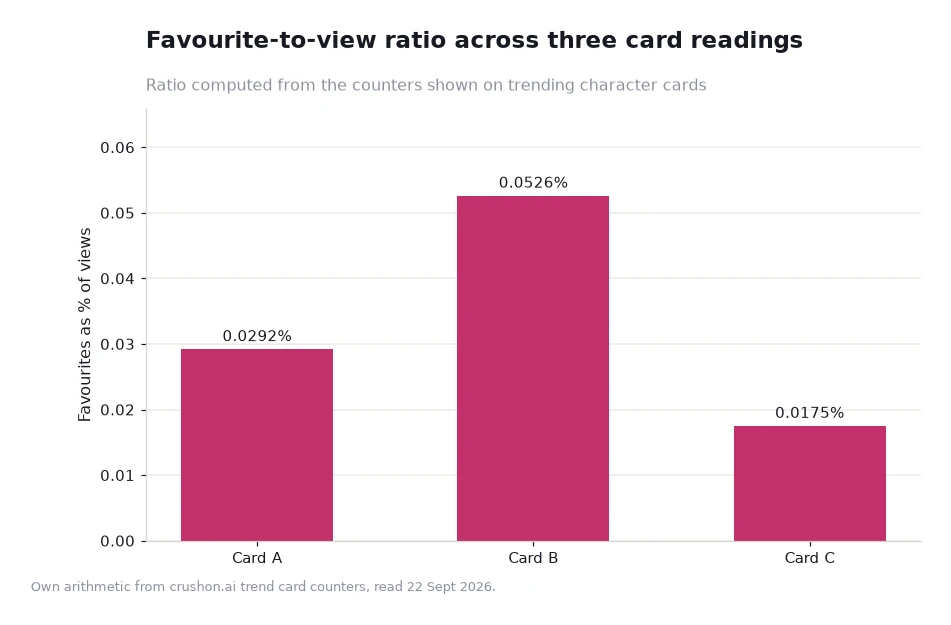
One habit that helps at the session level is knowing how much attention a card absorbs before you open it. The counters on a trending card give that away cheaply: divide favourites by views and you get a keep rate. On the readings used for this piece the rates were 0.0292%, 0.0526% and 0.0175% - a threefold spread from the lowest to the highest, and 1.8 times between the top reading and the middle one.
That matters for screen privacy only indirectly, and the indirect route is the useful one. A card with a high keep rate is one readers return to, which tends to mean longer sessions. A card with a very low rate is one that gets opened and dropped, so the same number of sessions produces less accumulated content. If your concern is how much material exists in an account, a shelf of cards you actually continue with is easier to manage than a wide set you half-try and abandon.
The mechanism is deliberately mundane: fewer abandoned conversations means less to review when you do your weekly check, and a smaller surface if someone ever borrows the device. There is nothing mysterious about keeping the account tidy; it is the same discipline as not leaving mail on a hallway table.
| Habit | What it prevents | Cost to you |
|---|---|---|
| Turn off notification previews | A message appearing on a lock screen after the session | One minute, once |
| Angle the screen away from the room | A passer-by reading the display | Nothing, decided once per seat |
| Sign out at the end of a session | The next person on the device opening the account | About ten seconds a session |
| Keep the platform out of shared browser profiles | Autofill, history and open tabs on a shared machine | One profile setup |
| Review the account weekly | Months of accumulated conversations you did not intend to keep | Two minutes a week |
| Read the removal and complaints policies once | Not knowing the route when something needs raising | Ten minutes, once |
Worked example: a month of sessions priced in minutes
Take the session arithmetic first, since it sets the scale. Five sessions a week at 14 minutes is 70 minutes a week, which over 4.3 weeks is 301 minutes, or about 5 hours a month. At 12 sessions a month - a slightly lighter pattern - it is 168 minutes, or 2.8 hours.
Now price the habits against that. Previews off is one minute. Signing out at ten seconds a session is 2 minutes over 12 sessions. The weekly review is 8 minutes a month. Add them and the routine costs about 11 minutes a month against 168 to 301 minutes of activity, which is between 4% and 7% of the time the habit already takes.
Compare that with the alternative, which is not a smaller number. Discovering that a preview displayed a message to somebody else, or that an account stayed signed in on a device you handed to a guest, costs a conversation you did not choose to have - which is why the cheap habits are worth doing even when the expensive ones feel more satisfying. All figures here are illustrative arithmetic, not platform data.
Building the routine in one sitting
Do the whole thing once, in order, and it takes about fifteen minutes. Lock the device that holds the account, switch off previews for the app, set up a browser profile that nobody else uses if the machine is shared, and read the two policy pages so you know where a report goes. That is the entire technical half of screen privacy, and none of it needs revisiting.
Then decide the session-level half. Pick a seat with a wall behind the screen rather than a corridor. End sessions deliberately rather than letting them fade, and sign out when you do. Keep the number of open conversations small enough to remember, because a conversation you have forgotten is the one that surprises you later. Start with the Crushon page offering ai porn chat; its FAQ is where the platform itself writes the term Porn Chat AI, and it is a better source for the current privacy wording than any forum summary.
Two supporting tools are worth a bookmark. The AI sex chat page sets out how the companion side of the product is described, which is useful when you are deciding what you are actually signing up for. And the character search page is better than a ranked shelf when you want a specific kind of card, since a deliberate search leaves fewer half-opened conversations behind than browsing twenty entries.
Frequently asked questions
Does private browsing make chat private?
It clears local history only. Conversations still exist in the account, which is why the platform publishes a content removal policy and a complaints policy for anything you need to raise.
Which single habit removes the most exposure?
Turning off notification previews. It prevents the most common case, where a message becomes visible on a lock screen after the session has ended.
How often should the account itself be reviewed?
Weekly, in about two minutes. That is 8 minutes a month against a habit that runs 168 to 301 minutes, so the check costs roughly 4% of the time.
Spend fifteen minutes, then forget about it
Screen privacy is one of the few parts of this hobby that can be finished. Set the device, kill the previews, choose a seat with a wall behind it, review the account once a week, and the rest is habit rather than vigilance. If you do nothing else, do the previews today: it is the cheapest change on the list and the one most likely to be tested by accident. The published privacy wording deserves a read, but a locked screen protects you more often than a paragraph does.
Data: card counters from the trending pages and privacy wording from the client's own product pages, read 22 Sept 2026[1]. Time and cost figures are own arithmetic shown as an illustrative profile, not platform measurements. Suitable for adults only; the platform is intended for readers aged 18 and above.